Before you adopt a package
Inspect the templates, interfaces, and choices it reaches across package boundaries.
For application teams and node operatorsCertora’s Daml Package Analyzer is a free, open-source static analysis tool for Canton applications. Inspect how compiled .dar packages interact, trace dependencies, and compare what changes between versions.
A package can create contracts, invoke choices, or read data defined in another package. The analyzer shows these connections so you can assess whether they belong in your application.
Select Exercise, Fetch or Create to see how a calling package can interact with another package.
An application invokes a choice defined in another package. Review the target and whether the choice consumes the contract.
Inspect the templates, interfaces, and choices it reaches across package boundaries.
For application teams and node operatorsCompare added, removed, and changed interactions to focus your review of an update.
For Daml developers and maintainersMap cross-package behavior, then trace relevant interactions to source locations when available.
For auditors and security researchersFrom the calling package to the target template or choice, the report makes cross-package behavior inspectable. Open these actual report screenshots for a closer look.
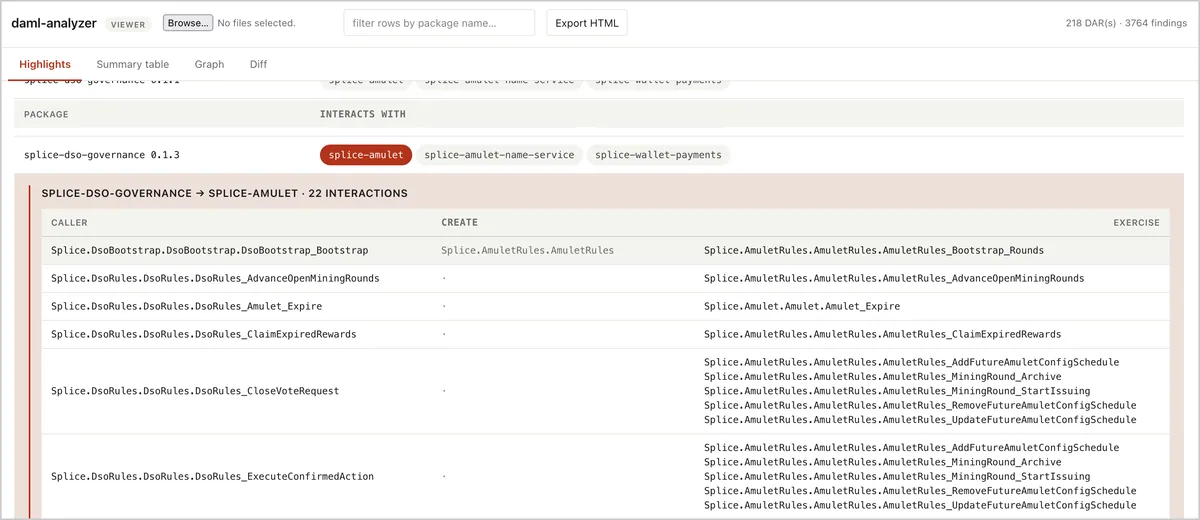
Find interaction details, including consuming status where relevant and available source locations.
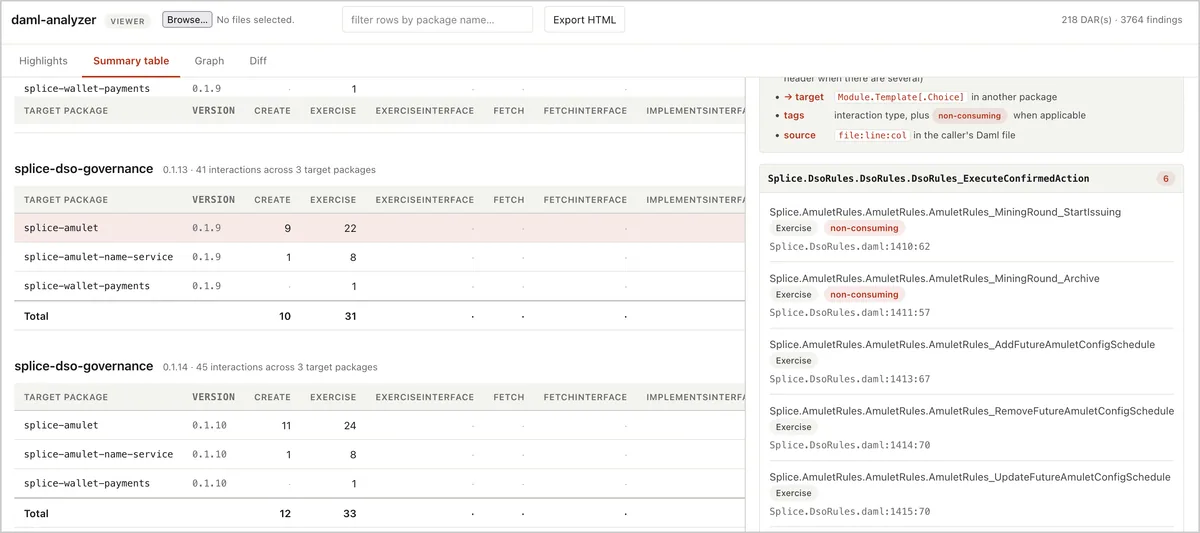
Explore counts by target package and interaction type.
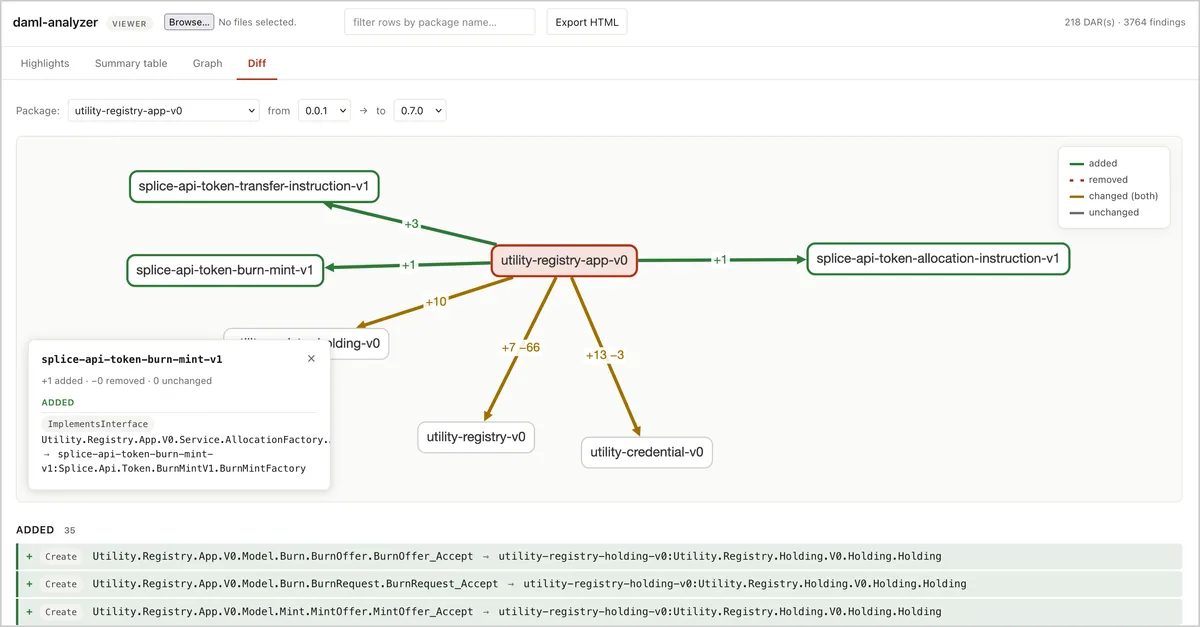
Inspect added, removed, and changed interactions between versions.
Developed through the Canton Foundation Development Fund. The first milestone delivered the core analysis engine and passed the public review vote.
“Certora pairs a rare level of security engineering talent with real drive from the top, and they took the time to understand Canton deeply before building for it. Their Package Analyzer, supported by the Canton Development Fund, helps Daml developers map package dependencies and catch unintended visibility early. It's a great example of the caliber of teams choosing to build on Canton.”
 Shaul KfirCo-Founder, Digital Asset (Canton Network)
Compile the Daml packages you want to inspect into .dar files.
Run against one DAR or list multiple DARs for a merged report.
Open the HTML report. Explore interactions and compare package versions.
Use the release JAR with Java 21+, or opt in to the DPM component in daml.yaml with DPM 3.5+.
dpm certora-analyze foo.dar -o out/java -Xss4m -jar daml-analyzer-<version>.jar foo.dar -o out/out/foo.html; multi-package runs produce out/report.html.ExerciseExerciseByKeyExerciseInterfaceCreateCreateInterfaceFetchFetchByKeyFetchInterfaceLookupByKeyImplementsInterfaceThe grant announcement explains the need for visibility into cross-package behavior in multi-party Daml applications.
Read the articleStart with the repository guide for local setup, command-line usage, and report generation.
Open the guideGet the published analyzer releases and review changes to reporting and the developer workflow.
Explore releasesRead the development proposal, planned milestones, and adoption objectives. Roadmap items describe intended work.
Read the proposalFollow the public delivery record and review of the analyzer’s first milestone.
View the milestoneRead Certora’s published evaluation of Canton DevKit v0.16.2 and its integration with the Daml Package Analyzer.
Read the ecosystem feedbackRequest a demo or hands-on onboarding with Certora. Bring your Canton use case: we can help you get started, interpret the output, and identify where to investigate next.
A free, open-source static analysis tool from Certora. It reads compiled Daml archives and reports cross-package interactions for human review.
The analyzer reads compiled .dar files. It runs locally and does not execute the code. Source locations appear when available in the archive.
Yes. Download the release JAR in your setup step, run it against compiled DARs, and use the JSON output in your own tooling.
Yes. The report viewer includes a Diff tab to compare interactions between versions of a package.
No. It maps static interactions; it does not prove that a system is secure or decide whether an interaction is intended.
Java 21 or later and a compiled .dar. Projects using DPM 3.5 or later can opt in to the DPM component. Source locations are best effort; list each DAR explicitly for multi-package projects.
The analyzer produces an interactive HTML report, structured JSON, and Graphviz DOT output. The HTML report includes Highlights, Summary Table, Graph, and Diff views. Interactions identify calling and target packages, templates or interfaces, choices where applicable, and source locations when available.
Daml application developers can inspect dependencies and review version changes. Security researchers and auditors can map cross-package behavior before a deeper review. Node operators can use the output as part of third-party package vetting.